
Both predefined workflows and long-running autonomous systems are considered agentic systems, but their architectures differ:
- workflows: LLMs and tools are orchestrated through predefined code paths;
- agents: LLMs dynamically direct their own execution and tool usage, retaining control over how tasks are completed.
When to Use / Not Use Agents
When building applications with LLMs, prefer the simplest solution that can work, and only add complexity when it is necessary. In many cases, this may mean not building an agentic system at all. Agentic systems usually trade latency and cost for better task performance, and you should decide whether that trade-off is justified.
When higher complexity is expected, workflows provide predictability and consistency for well-defined tasks, while agents are better when flexibility and model-driven decision-making are required. For many applications, however, optimizing a single LLM call with retrieval and good in-context examples is sufficient.
When and How to Use Frameworks
Many frameworks make implementing agentic systems easier, including:
- LangGraph from LangChain;
- Amazon Bedrock’s AI Agent framework;
- Rivet, a drag-and-drop GUI LLM workflow builder; and
- Vellum, another GUI tool for building and testing complex workflows.
These frameworks simplify standard low-level tasks such as calling LLMs, defining and parsing tools, and chaining calls, so it is very easy to get started. But they often add extra abstraction layers that obscure the underlying prompts and responses, making debugging harder. They can also make it tempting to add complexity even when a simpler setup would be enough.
Our recommendation is to start directly with LLM APIs: many patterns only need a few lines of code. If you do use a framework, make sure you understand the underlying code. Wrong assumptions about internals are a common source of customer-facing bugs.
Building Blocks, Workflows, and Agents
Start from foundational building blocks and add complexity gradually.
The foundational block of an agentic system is an augmented LLM, enhanced with capabilities such as retrieval, tools, and memory. Current models can:
- generate their own retrieval queries;
- choose appropriate tools;
- decide what information to retain.
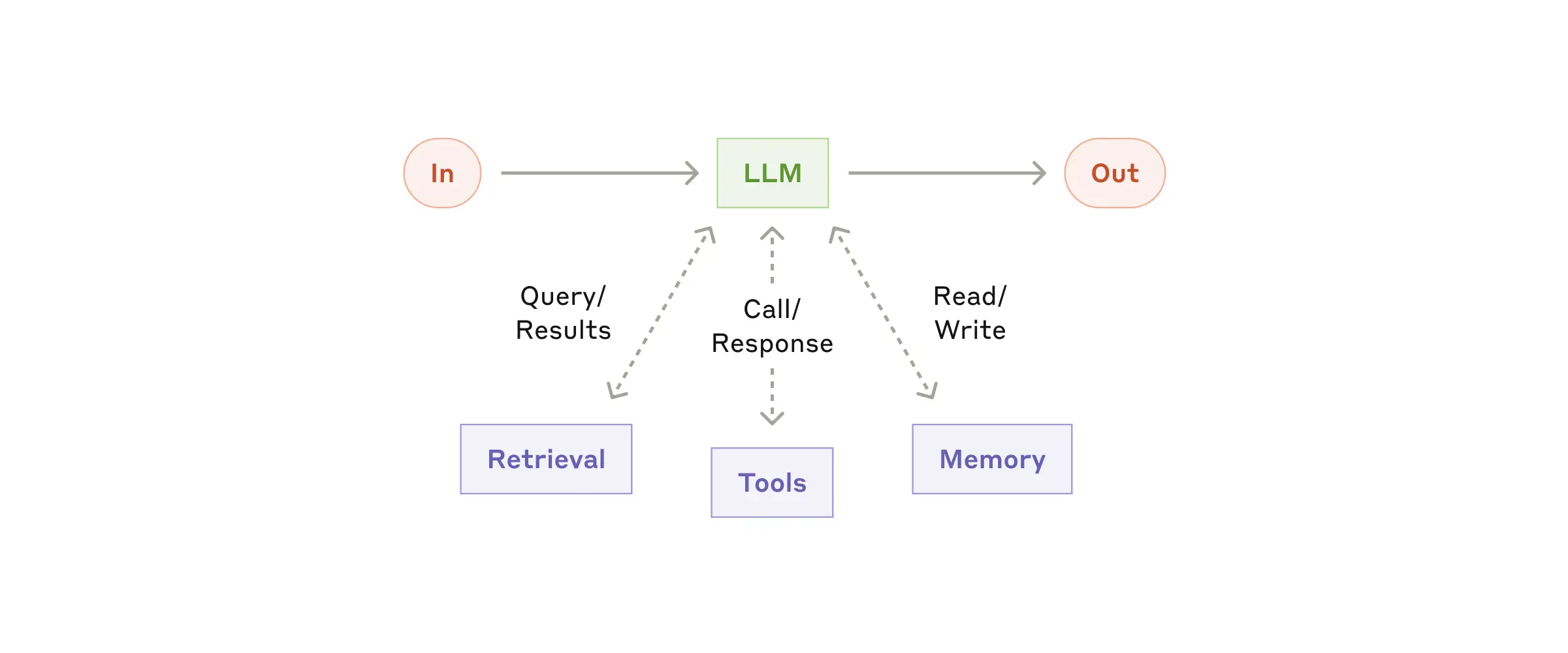
We recommend focusing on two key implementation aspects:
- Tailor these capabilities to your specific use case.
- Ensure they expose a suitable, well-documented interface to your LLM.
There are many ways to implement these augmentations. One example is the recently released Model Context Protocol, which allows developers to integrate with a growing third-party tool ecosystem using a simple client implementation.
In the rest of this article, we assume each LLM request already has access to these augmented capabilities.
Workflow: Prompt Chaining
Prompt chaining decomposes a task into sequential steps, where each LLM call processes the previous output. Programmatic checks can be added at any intermediate step to keep execution on track.
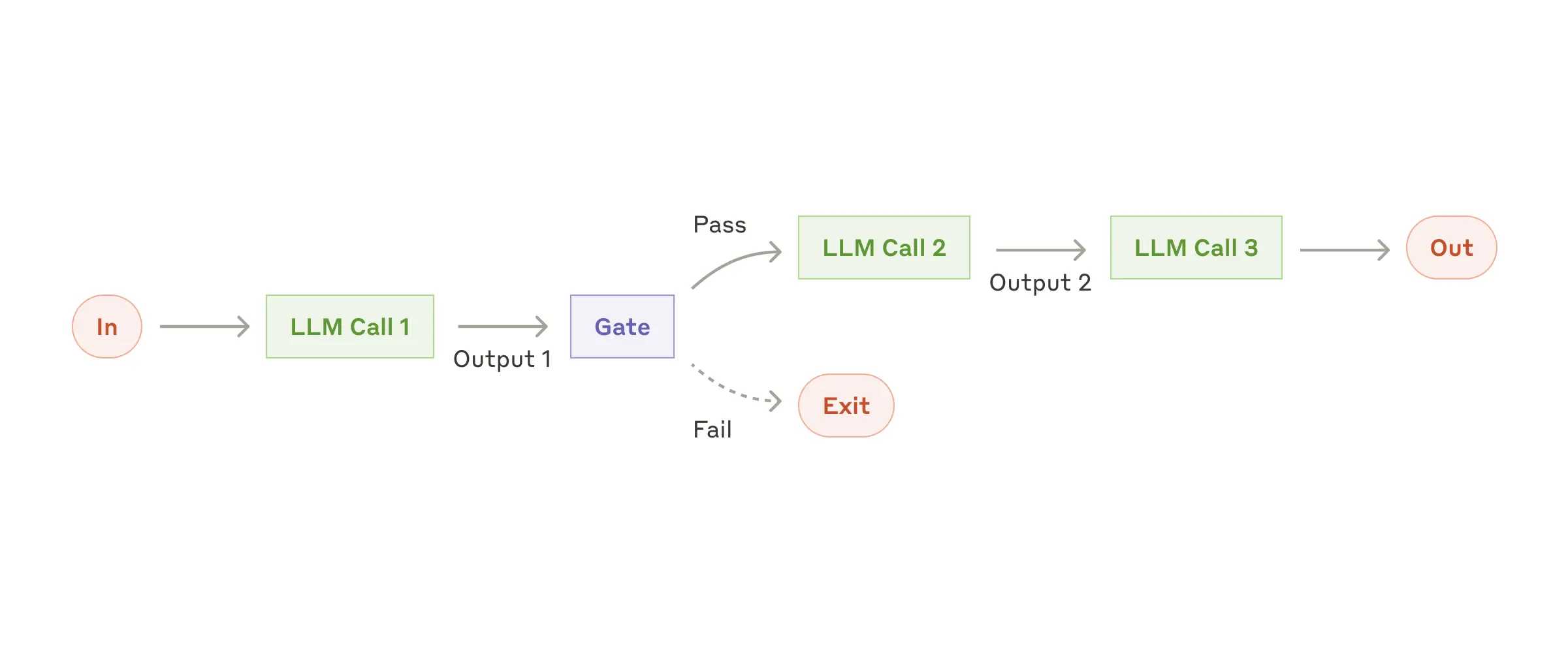
When to use this workflow: prompt chaining is ideal when a task can be cleanly broken into fixed subtasks. The goal is to improve accuracy by simplifying each LLM call, at the cost of extra latency.
Useful examples for prompt chaining
- Generate marketing copy, then translate it into another language.
- Write a document outline, verify it against standards, then generate the full document from that outline.
Workflow: Routing
Routing identifies the input type and directs it to a corresponding downstream task. This enables separation of responsibilities and more specialized prompts. Without routing, optimizing for one input class can hurt performance on others.
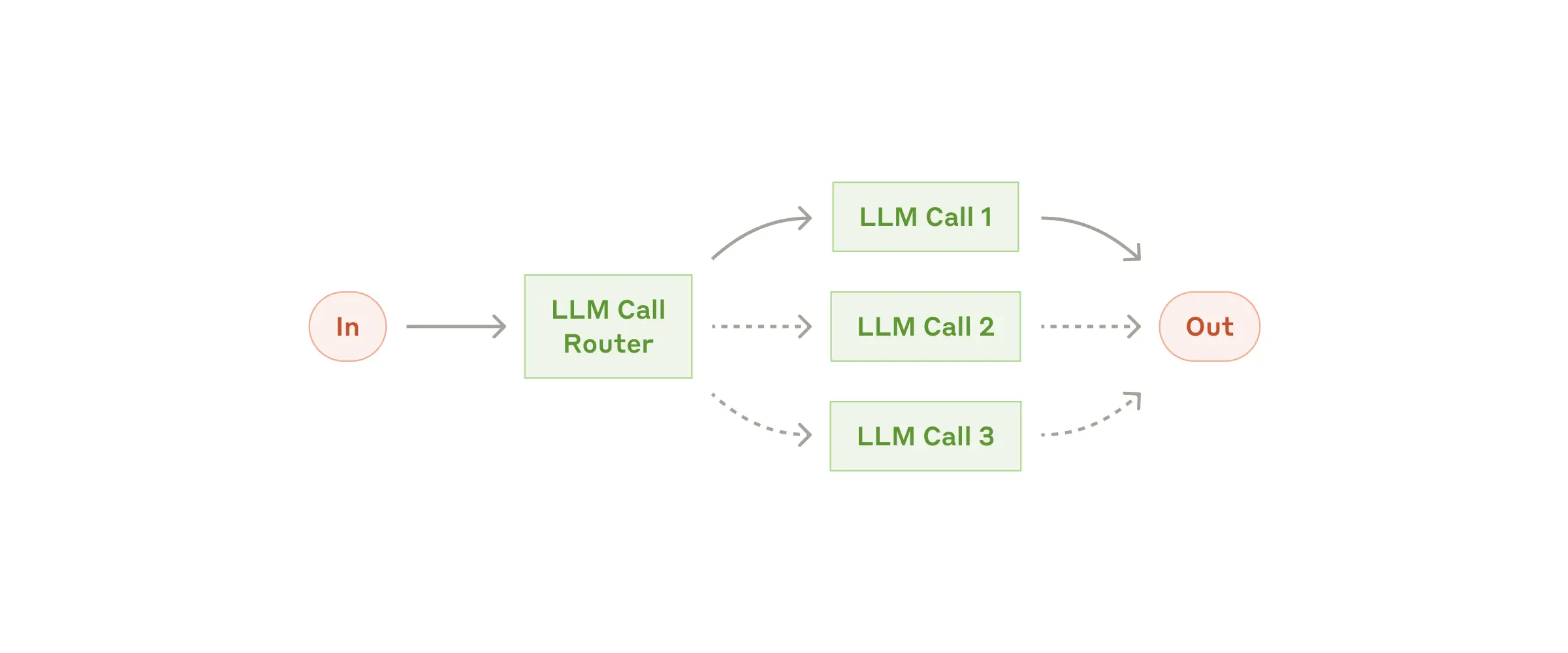
When to use this workflow: routing works well for complex tasks where distinct categories are better handled separately, and category assignment can be done accurately via an LLM or a traditional classifier.
Useful examples for routing
- Route different customer support requests (general questions, refund requests, technical support) to different downstream flows, prompts, and tools.
- Route common/easy requests to smaller models (for example Claude 3.5 Haiku), and difficult/unusual requests to stronger models (for example Claude 3.5 Sonnet) to optimize cost and speed.
Workflow: Parallelization
LLMs can sometimes process parts of a task simultaneously and combine outputs programmatically. This workflow has two main variants:
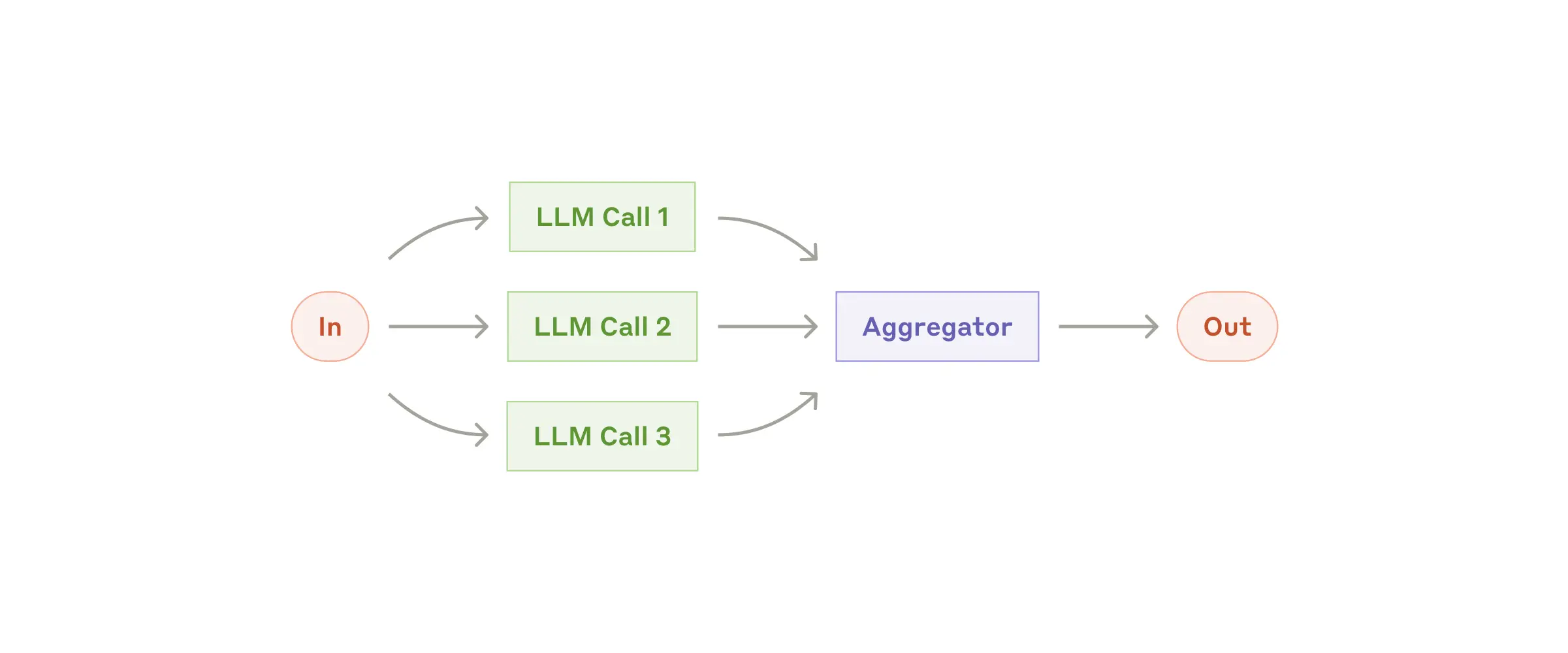
- Sectioning: split a task into independent subtasks and run them in parallel.
- Voting: run the same task multiple times to sample an output distribution.
When to use this workflow: parallelization is effective when subtasks can run independently for speed, or when multiple perspectives/attempts improve confidence. For complex tasks with multiple concerns, separate LLM calls per concern often improve quality through focused attention.
Useful examples for parallelization
- Sectioning:
- Implement safeguards where one model handles the user request and another screens for unsafe content or policy violations.
- Automate LLM evaluations where each call checks a different performance dimension.
- Voting:
- Review code for vulnerabilities using multiple prompts and aggregate findings.
- Evaluate whether content is inappropriate using multiple prompts and voting thresholds to balance false positives and false negatives.
Workflow: Orchestrator-workers
In the orchestrator-workers workflow, a central LLM dynamically breaks down tasks, delegates them to worker LLMs, and combines the results.
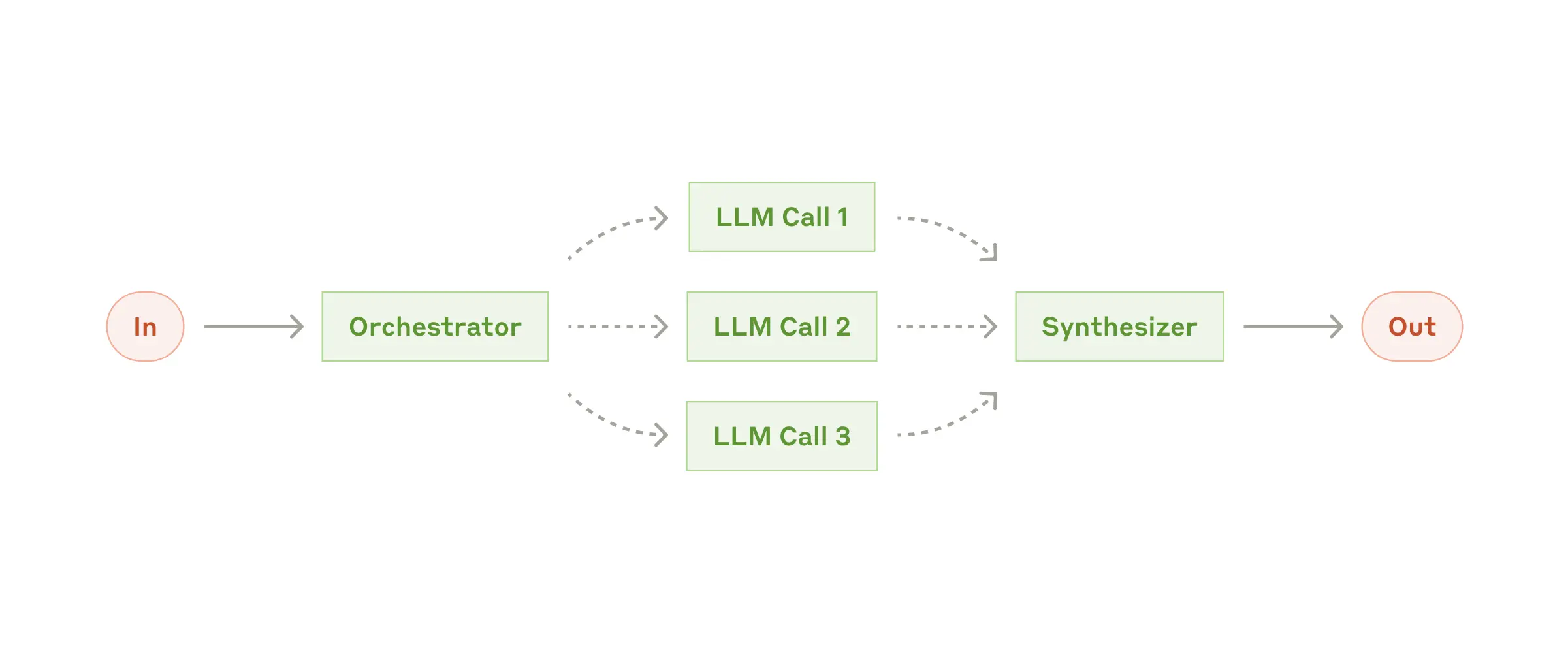
When to use this workflow: ideal when required subtasks are not predictable in advance (for example coding tasks, where the number of files and edits depends on the issue). Although visually similar to parallelization, the key difference is flexibility: subtasks are decided by the orchestrator at runtime, not predefined.
Useful examples for orchestrator-workers
- Coding products that need complex multi-file changes per request.
- Search tasks that gather and analyze information across multiple sources.
Workflow: Evaluator-optimizer
In the evaluator-optimizer workflow, one LLM call generates a response while another provides evaluation and feedback in an iterative loop.
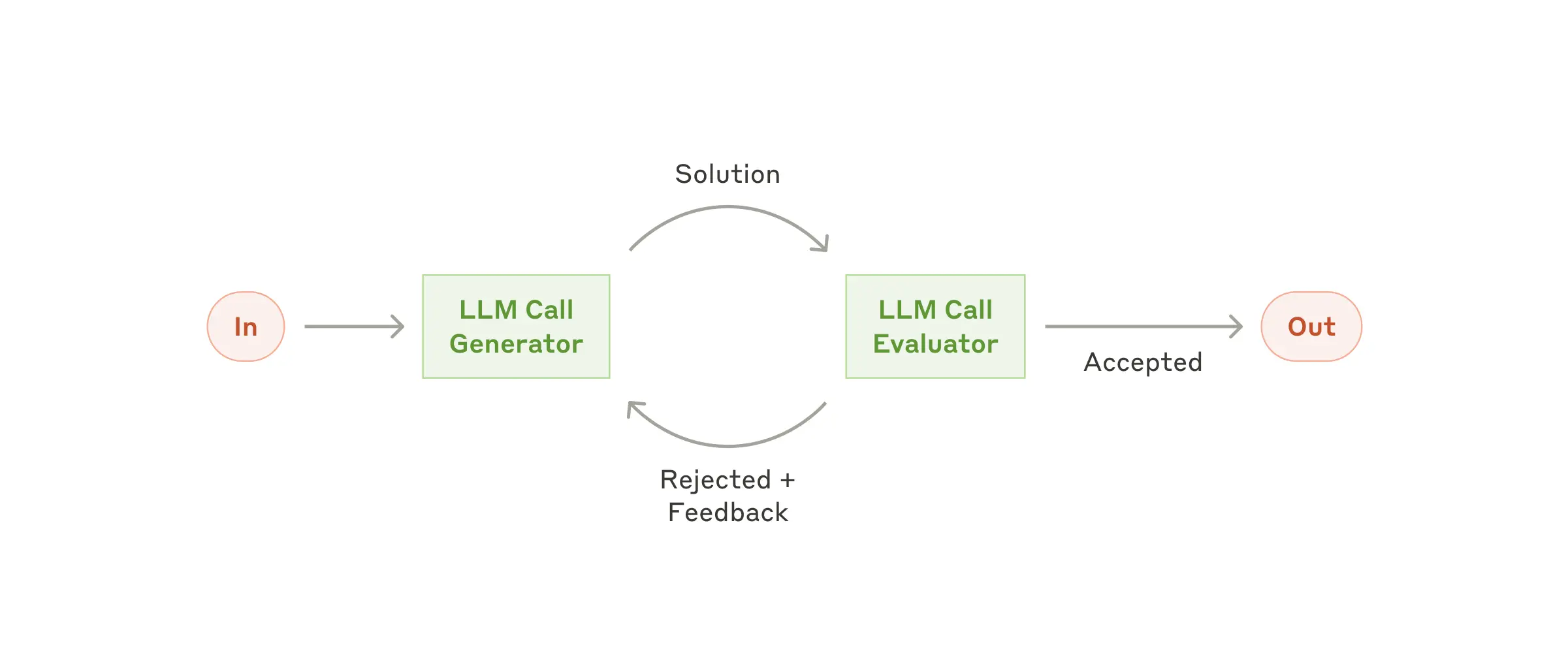
When to use this workflow: especially effective when evaluation criteria are clear and iterative refinement creates measurable value. Two strong signals are: (1) the output improves clearly when given human-style feedback; (2) an LLM can generate that feedback well. This mirrors human iterative drafting for polished writing.
Useful examples for evaluator-optimizer
- Literary translation where subtle nuances are missed in initial drafts but can be improved through critique.
- Complex research tasks requiring multiple search-analysis rounds, where an evaluator decides whether further searching is needed.
Agents
As LLM capabilities mature in key dimensions (understanding complex input, reasoning/planning, reliable tool use, and recovery from errors), agents are increasingly viable in production.
Agent work usually starts from a user command or interactive discussion. Once the task is clear, the agent plans and executes autonomously, and may ask humans for additional information or judgment when needed. During execution, agents must repeatedly get “ground truth” from the environment (tool outputs, code execution results, etc.) to evaluate progress. Agents can pause at checkpoints or blockers for human feedback. Tasks usually terminate on completion, but should also include stop conditions (for example max iterations) for control.
Agents can handle complex tasks, but implementations are often simple. In many cases, an agent is just an LLM using tools in a loop based on environmental feedback. This is why clear toolset design and documentation are critical. Appendix 2 expands on tool prompt-engineering practices.
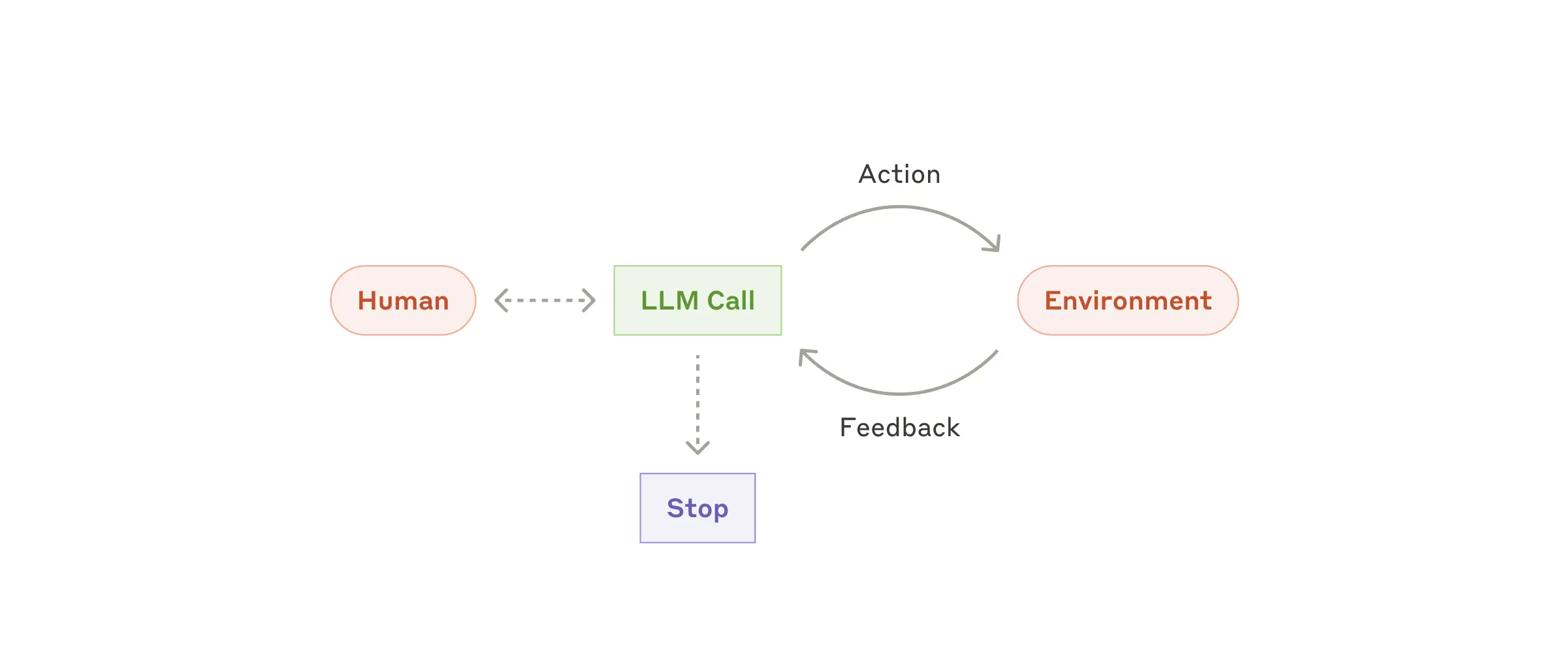
When to use agents: agents are suited to open-ended problems where required steps cannot be predicted and fixed paths cannot be hardcoded. LLMs may operate over multiple turns, and you must trust model decision-making to some extent. Agent autonomy makes them ideal for scaling work in trusted environments.
That same autonomy also increases cost and error accumulation risk. We recommend extensive sandbox testing and appropriate guardrails.
Useful examples for agents
Examples from our own implementations:
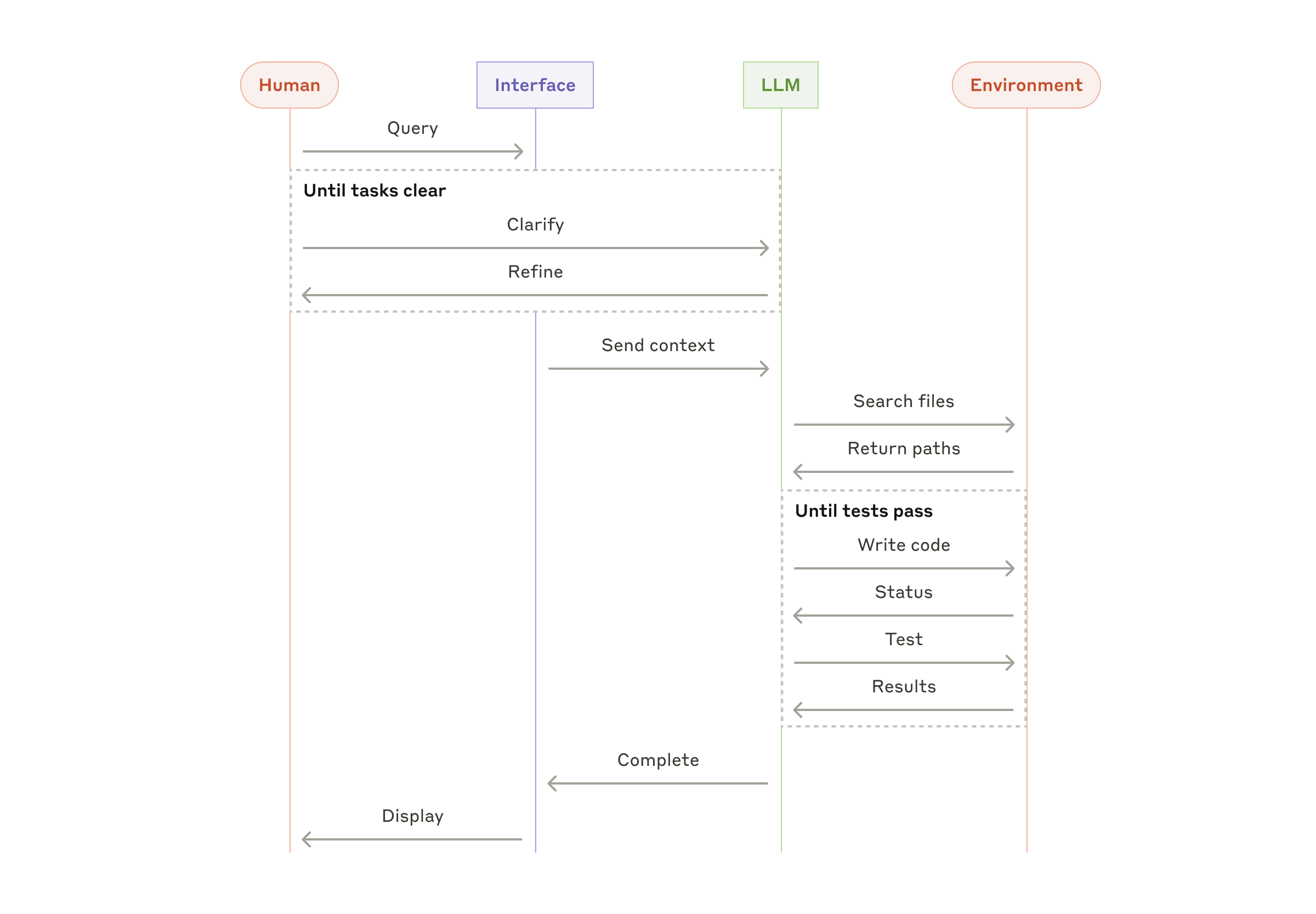
- A coding agent for SWE-bench tasks, involving multi-file edits based on task descriptions.
- Our computer use reference implementation, where Claude uses a computer to complete tasks.
Combining and Customizing These Patterns
These building blocks are not rigid templates. They are common patterns you can shape and combine per use case. As with any LLM feature, success depends on measuring outcomes and iterating continuously. Again: only add complexity when it materially improves results.
Summary
Success in LLM applications is not about building the most complex system, but the system that fits your needs. Start with simple prompting, optimize through thorough evaluation, and only add multi-step autonomous systems when simpler approaches fail.
When implementing agents, we try to follow three core principles:
- Keep agent design simple.
- Prioritize transparency and clearly expose planning steps.
- Build the agent-computer interface (ACI) carefully through strong tool documentation and testing.
Frameworks can help you start quickly, but when moving to production, do not hesitate to reduce abstraction and build with fundamental components. Following these principles helps create agents that are powerful, reliable, maintainable, and trusted by users.
Appendix 1: Agents in Practice
Our work with customers has revealed two especially promising application areas that demonstrate the practical value of the patterns above. Both show that agents create the most value in tasks that require both dialogue and action, have clear success criteria, support feedback loops, and allow effective human oversight.
A. Customer Support
Customer support combines a familiar chatbot interface with capabilities enhanced by tool integration. This is a strong fit for open-ended agents because:
- support interactions naturally follow conversational flows while requiring access to external information and actions;
- tools can retrieve customer data, order history, and knowledge-base content;
- actions such as issuing refunds or updating tickets can be handled programmatically;
- success can be measured clearly through user-defined resolution outcomes.
Several companies have demonstrated viability through usage-based pricing that charges only for successful resolutions, reflecting confidence in agent effectiveness.
B. Coding Agents
Software engineering shows significant potential for LLM agents, evolving from code completion to autonomous problem solving. Agents are effective here because:
- code solutions can be validated by automated tests;
- agents can iterate based on test feedback;
- the problem space is well-defined and structured;
- output quality can be measured objectively.
In our own implementation, agents can now resolve real GitHub issues directly from pull-request descriptions on SWE-bench Verified. Still, while automated tests validate functionality, human review remains essential to ensure broader system alignment.
Appendix 2: Prompt Engineering for Tools
No matter what type of agent system you are building, tools are likely core components. Tools allow Claude to interact with external services and APIs through explicit structure and definitions in our API. When Claude intends to call a tool, the API response includes a tool-use block.
Tool definitions deserve the same level of prompt-engineering attention as your main system prompt. This appendix summarizes practical guidance.
There are often multiple ways to represent the same operation. For example, file editing can be represented as diffs or full-file rewrites. Structured output can be returned as markdown or JSON. In software engineering these formats are often equivalent, but some are harder for LLMs to produce reliably. Writing diffs requires precise line accounting. Writing code inside JSON requires extra escaping for quotes and newlines.
Our recommendations for choosing tool formats:
- Give the model enough token budget to think before it commits to brittle output.
- Keep formats as close as possible to text naturally seen on the internet.
- Avoid unnecessary format overhead (for example strict line counting over very large files, or mandatory string escaping of generated code).
A practical rule: invest as much effort in ACI (agent-computer interface) as teams normally invest in HCI (human-computer interface).
Ideas to improve ACI quality:
- Put yourself in the model’s position. Are tool descriptions and parameters obvious, or do they require deep interpretation? Good tool docs usually include usage examples, edge cases, input-format requirements, and clear boundaries from other tools.
- Refine parameter names and descriptions to make intent unambiguous, as if writing excellent docstrings for junior developers.
- Test tool usage behavior with many examples in the Workbench, observe recurring errors, and iterate.
- Add poka-yoke mechanisms to make misuse harder.
When building our agent for SWE-bench, we actually spent more time optimizing tools than the overall prompt. For example, we found that relative file paths caused failures once the agent moved away from root directories. We fixed this by requiring absolute file paths in tools, and observed much more reliable model behavior.